
|
The holiday season has arrived, even if it looks a little bit different this year! Hopefully both you and your Salesforce users have some well-deserved time off planned, and I want to help you switch off and relax during your leave. Here are some tips for Salesforce admins to make sure you can get in the festive spirit. Make sure your users are informed of reduced support hours Let’s start with the basics. Maybe you have a team for Salesforce support, or perhaps you’re a solo admin- either way, it’s likely that your users rely on your technical expertise and will need to know of any reduced support hours over the holidays. As well as the usual out-of-office, you can make use of rich text components in Lightning or custom home page components in Classic to display this information to all users upon login, or if your organisation uses Chatter you could post an announcement. 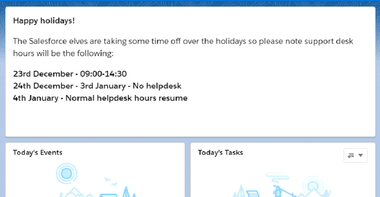 Complete a back-up If you are going to have a period of total downtime and normally use Salesforce’s Data Export tool, chances are you might miss a scheduled back up, so it would be a good idea to do a manual export just before the holidays. Think about delegated administration Do you have delegated administrators who can perform basic, restricted tasks like password resets or unlocking users in your absence? If not, have a read up and consider whether this might a good time to give it a go. Empower users to support themselves as much as possible This one will stand you in good stead all year round! Do your users have everything they need to attempt troubleshooting before they come to you? Do they have guidance documentation, videos or how-to sheets? Think of the one area of support that you’re most called upon for. How could you tweak the system or upskill users to need this support less often? For instance, let’s say you have an approval process and users keep getting error messages because they’re attempting to submit records that don’t meet the entry criteria. Perhaps you could prompt them with In app guidance. Or if it’s a custom object you could take advantage of the great new feature from the Winter ’21 release, Dynamic Actions, and only have the Submit for Approval appear when the record meets the relevant criteria! Think about whether case or approval assignments need temporarily tweaking If you have any cases or approvals that are generally assigned to just one user, could you consider having a queue or a delegated approver? This would allow your users to cover each other more effectively and keep processes flowing smoothly during the holidays. Give your org some festive flair! We’ll end on my favourite one- once you’ve got the nuts and bolts in place, why not have some fun and add some festive touches to lightning pages on your org? Here I’ve used Themes and Branding in Setup to create a temporary theme for the holidays: 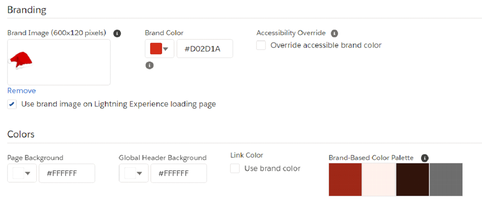 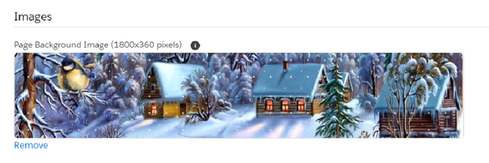 And here's the result! 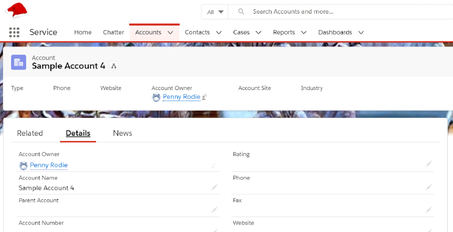 I hope you found these tips helpful. The only thing left to say is happy holidays!
0 Comments
 With Spring ’21 just around the corner, we wanted to take some time to revisit some of the features of the Winter ’21 release that have been utilised by the charities we support.
Printable view A question we have been asked so often by our Lightning Community users is ‘how do I go about printing this?’, so when we found out that that printable view would be rolled out as part of Winter ‘21 we were excited to let them know. This has been so useful for many of the charities and users we support on a daily basis, which is why it’s made it onto our top picks. Salesforce optimizer This has been such a cool feature which we are starting to utilise more for all of the different production orgs we support. It also received a lot of rave reviews in the Salesforce community. We work closely with a wide variety of amazing charities that do great work and have enjoyed how this feature can be utilised to take stock of areas where we can continuously improve, for example security and implementing updates. One of the interesting upgrades made to the optimizer was allowing us to schedule a run, for example once a month. As part of this release metric history has also been introduced which has been useful in terms of seeing where our orgs are improving. Filter reports using field comparison Reporting is crucial for all the charities we work with and we enjoy helping them to understand and extrapolate data that is vital for decision making. That’s why I wanted to include this feature which we have had a play around with. It is important to note that this currently only a beta feature as part of the Winter ‘21 release, however nonetheless something to get really excited about. It allows you to filter a report by comparing values of two different report fields, some powerful stuff! Lightning experience 2020 has definitely been the year of change for all of us. Our team have worked on many exciting projects assisting charities to transition to Lightning experience. A key point from this year’s Winter ’21 release is that lightning experience will be automatically activated for all orgs, and once it has been enabled you will no longer be able to disable it. Users can still switch between lightning and classic if required. It is an important time for organisations to consider putting in place a strategy to transition to lighting experience. Feel free to get in touch to discuss how our team can get you started on this journey. |
 RSS Feed

|

|
|
Real Systems is a Salesforce Partner specialising in building cloud-based client monitoring systems for the charitable, small business and local authority sectors. All our profits are donated to St Mungo’s to help fund its charitable work supporting homeless and vulnerably housed people across London and the south of England.
St Mungo’s, 3 Thomas More Square, Tower Hill, London E1W 1YW T:020 3856 6000 | Registered Charity No 1149085, Company No 8225808, Housing Association No LH0279 |Terms & Conditions | Privacy policy | © Copyright 2016 St Mungo's
St Mungo’s, 3 Thomas More Square, Tower Hill, London E1W 1YW T:020 3856 6000 | Registered Charity No 1149085, Company No 8225808, Housing Association No LH0279 |Terms & Conditions | Privacy policy | © Copyright 2016 St Mungo's